Posts

Showing posts with the label Visual Studio

JustMock and "Failed to initialize coreCLR" on RC2

Image
Unable to start the process. Failed to initialize CoreCLR, HRESULT: 0x80131500 I just installed ASP.NET Core RC2 and was able to get it working from the command line, on some new basic tests projects. But when I tried to do it from Visual Studio I got the following error.  If I tried to run "dotnet" in a console opened from Visual Studio, I would get the same error. So the issue was that something was off for the VS configuration/environment.  After verifying that "dotnet" was able to run perfectly everywhere else I took into the task of comparing the environment variables (dichotomically, of course). One particular variable made the difference: "JUSTMOCK_INSTANCE=XXXXX", so that lead me to notice that JustMock was interfering with it somehow.  So, if you use JustMock just turn it off for RC2 projects. (No need to uninstall it, just disable the profiler)

Fixing Visual Studio 2015 Android Designer with Xamarin

Image
While using Visual Studio 2015 to edit and android layout file ( axml ) I got this error:   The installed Android SDK is too old. Version 24.3.4 or newer is required The number version might be different in your case. Here are a few possible causes for the error: 1) You actually need to upgrade your Android SDK. 2) You have the wrong path for the Android SDK installation on Visual Studio. (change it on Tools->Options->Xamarin) 3) Mixed Xamarin extensions (this was my case) After reinstalling the Android SDK and checking the everything was fine on that part I went to check on Visual Studio extensions ( Tools -> Extensions and Updates ). It turns out that  I caused a mix up of versions, since I already had Xamarin and Visual Studio 2013 side by side. and now 2015 had another one, my Visual Studio 2015 ended up with 2 extensions for Xamarin. Disabling one of them solved the problem and the designer was working again. The one that I disabled was titled "...

From AsyncCompleted to async await

Since we got the magic of async/await on C# things got much easier on the developer front. Working with Tasks is the key to it, but we also have two older approaches in .NET framework that we need to deal with.  APM (Asynchronous Programming Model) The pair of Being / End methods.  EAP (Event-based Asynchronous Programming) The Method Async / Method Completed pair. Converting from APM to Tasks is achieved by means of the   System.Threading.Tasks.TaskFactory   class and its generic counterpart. Now converting from EAP to Tasks  requires us to use the TaskCompletionSource<T> class and notify of the state of the task as it goes. See the example of a "handshake" operation in a WCF service. I am also using the approach from my older post regarding events and anonymous methods. The return type of the WCF operation is WrappedResultOfString , and that will be the actual generic parameter of the Task<T> that the HandshakeAsync method will produ...

My favorite (critical) developer tools

Image
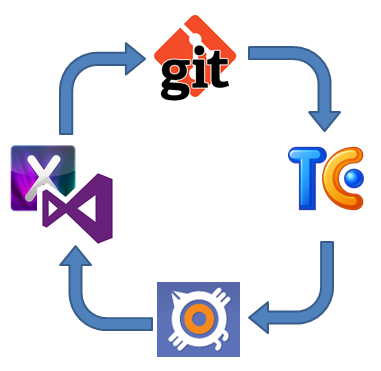
In addition to pizza, caffeine, and video games, a developer requires a lot of tools, and I mean "a lot". Each one is different so here I want to showcase what I use, and briefly explain why. The idea of this post rather than make any type of advertising (notice there are no links at all) is more to actually find out what other people use and share with you all my experience. So, the profile:  .NET Developer. The usual work: Web applications with ASP.NET (Web Forms and MVC) Windows Forms Windows Presentation Foundation Windows Phone Apps iOS Apps  Of course, I might code almost every day a bit of JavaScript and some HTML/CSS fixes, along with some other things, but that's not enough to consider it the main course. The Infrastructure Before coding, organization and planning is everything, and that means for me 3 things, since I am a SCRUManiac: Source Control Issue/Bug tracking Continuous Integration For source control, I prefer Git particularly, ...

Events and Multithreading

This is  the second and final part of this series. Will focus now a bit on what happen when we add multithreading to our work with events. Cleaning Up Events and Context Information In the previous post I mentioned some issues using lambdas and anonymous methods on events. The unsubscribe problem had a tricky "solution" by declaring a "cleanup" method inside the class that holds the event. public void CleanupSubscribers() { SayHelloCompleted = null; } The problem here is obvious since the cleanup method will remove all subscribers from the event. Hence, individually removing listeners from the event gets tricky when using lambdas/anonymous methods. So in this case the recommendations would be: Do not use lambdas if you need to unsubscribe. If you do so, use the cleanup method UNLESS your code is multithreaded.  NOTE: this only applies to the use of lambda expressions and anonymous methods, as for regular named methods yo...

The lambdas, the anonymous and the events

Combining lambdas, anonymous methods and events feels natural in C#, and we use them almost as a reflex, they help us to create closures and avoid creating state variables outside the scope of our methods or passing extra state data through event calls. But one thing that come with events is the fact that writing good applications implies making good use of the resources, meaning we have to dispose those we no longer need. When using events with lambdas and anonymous methods, is possible to forget about that, thus writing code that is not efficient and prone to crashes. Will start this 2-part series talking about the subscribe/unsubscribe behavior. Subscribe/Unsubscribe lambdas and anonymous methods Let's begin with a basic scenario using events in a single-thread context for now; just to keep it simple. The code fragment below contains the HelloEventArgs implementation as well as the publisher class MyClassWithEvents . public class HelloEventArgs:EventArgs { ...

Windows Phone vs iOS Development (with C#): Round One

Image
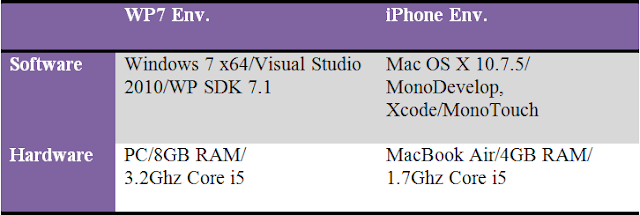
DISCLAIMER: This is not about iPhone vs WP7 devices; its about development tools. If you think you can enter into a device fight here, or you like to listen to Justin Bieber, you should leave the page now. I like programming, and that's it. Well...no. I LOVE programming. No matter the platform, OS, framework or  language; I find that programming is a rewarding experience. Of course as with anything in life, you want that experience to be as smooth as possible. And that's why I am so picky with development tools... They are supposed to make my work easier. And this entry is about that, comparing the development tools used to create apps for iOS (iPhone) and Windows Phone. Recently I had the opportunity to develop the same mobile app for two platforms: Windows Phone and iOS. While I have developed for these platforms before, I rarely have coded the same app (and a complex one) for the two of them. And this is a good chance to perform a comparison, beca...

Using WPConnect instead of Zune for Windows Phone development

Image
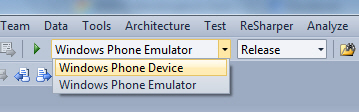
Sometimes you get so used to do something everyday that you don't appreciate how much time it saves you. So in this entry I want to go back to the basics and comment on something I had been asked many times. I remember the times where we used Active Sync to connect Windows Mobile devices, is was not that hard but it could get tricky some times, depending if the device was connected via USB or Wi-Fi, emulators via  DMA and more. And to be honest, it was not that long ago. Fortunately the new Microsoft Windows Phone 7 series does this in a pretty easy way. Zune Besides being used to download apps, musics, podcasts or to sync content between the computer and the device. The Zune software is what we can easily use to "hook up" your device with your Visual Studio and deploy apps to your phone. If you are a registered developer at Microsoft Marketplace just connect your unlocked/activated phone. Run Zune if not setup to auto-start. Then on the Visual Stud...

Git, git extensions and the case-sensitive thing...

As a general rule, I always use some kind of source control on all my projects. For the matter of fact I use GIT even when some people might find that weird, being myself a .NET developer .... But hey... GIT is in my opinion the best things out there when it comes to really good team development tools. Then the second part is to use it with people online, for that github.com is pretty good, and the final part is a good add-in for Visual Studio or a shell extension. I use Git-Extensions for all that and so far, except for the little problem I am going to explain here, I have no complains at all. The problem: Git branches are case-sensitive, so you can have "test" and "TEST" as different branches, and it will work fine if you use linux as a client. But when using git-extensions from Windows, and ran into a huge problem, where one of my friends was pushing code and I was not able to see it. She was uploading code to same branch but just with different casing. Is ...

Referencing Silverlight assemblies from non-SL projects

Image
One of the best things about Silverlight is that represents a set of portable functionality that you can expect to run almost anywhere. Its similarity – although reduced – with WPF results in an amazing way to develop rich UIs and logic in Browser-side apps. And then results normal to want to reuse Silverlight code from our own .NET applications. Reusing code from Silverlight assemblies is possible; the referencing process works well because Silverlight is a subset of .NET Framework, so that “by logic” should just work. Of course this is not all happiness, there are lot of limitations, but it will work as long as you keep yourself into the borders of certain assemblies like Mscorlib , System ,System.Core ,System.ComponentModel.Composition and Microsoft.VisualBasic , playing with others might give you mixed results. Now the trick. You SHOULD NOT add the reference to the Silverlight PROJECT. You MUST add the reference to the Silverlight ASSEMBLY. So let’s assume you have a scenario with...