Posts

Showing posts with the label c#

Avoid Multiple Cache Refreshes: The Double Check Approach

 In previous articles, we've stressed the importance of caching to enhance the performance of our applications. This time, we're discussing a small yet potent tip to further amplify the benefits derived from caching. A standard caching routine often looks like this: This code is 'functional' and can be regarded as the 'default' approach to caching. Here, we're fetching a value from the cache, and if it's missing, we generate it and store it for future requests. However, a problem arises when we deal with a high-traffic application, such as a .NET Core web application or API, which must handle many concurrent requests. Suppose multiple requests reach this code simultaneously, each finding that it needs to generate the value. In such a case, you'll experience "multiple" refreshes of the same value and several calls to SetValue. To prevent this, we can employ a mutual-exclusion (mutex) lock to restrict multiple threads from accessing the sam...

The Power of Simplicity: How a random iterator saved the day

Image
 …and my database. How many times has something so simple saved the day? Sometimes, the simplest solutions can have a significant impact on a problematic situation. In this blog post, we'll explore one such scenario where a small algorithm change led to substantial performance improvements in an existing system. The problem  The issue at hand involved a component in a system using a database table as a makeshift queue for processing updated rows. Multiple processor instances read from the same table, with Redis locking in place to prevent concurrent processing of the same row. However, the processors working in the same order led to numerous collisions and timeouts, causing the system to slow down.  As illustrated in the image, the processors were interfering with one another; while they ultimately completed the work, excessive time was consumed in fruitless attempts to lock records, which consequently increased the strain on the database. The solution: A Random Iterator ...

Playing with strings and performance in C#

Image
A few weeks ago, I was solving a problem at HackerRank and after completing a solution that ran  under 100 milliseconds, the program would still timeout during execution. HackerRank limit is usually 1 second, so something was taking more than 900ms. It was the strings! Yes, we know handling strings is costly, but this time there was no way around it.  At the final stage of the problem I had to construct a string over 200k chars long from an array of Boolean values that represented the bits of the number.   Disclaimer : Strings are slow, mainly because they are immutable. Concatenating two strings, creates a third one and possibly 2 for the garbage collector to pickup. Looking through the code I noticed I was simply using " += " instead of StringBuilder.Append method. After using StringBuilder the solution was faster and the submission was approved. It was  fast now, but it got me thinking "how much faster indeed?" which ended with me measuring t...

From AsyncCompleted to async await

Since we got the magic of async/await on C# things got much easier on the developer front. Working with Tasks is the key to it, but we also have two older approaches in .NET framework that we need to deal with.  APM (Asynchronous Programming Model) The pair of Being / End methods.  EAP (Event-based Asynchronous Programming) The Method Async / Method Completed pair. Converting from APM to Tasks is achieved by means of the   System.Threading.Tasks.TaskFactory   class and its generic counterpart. Now converting from EAP to Tasks  requires us to use the TaskCompletionSource<T> class and notify of the state of the task as it goes. See the example of a "handshake" operation in a WCF service. I am also using the approach from my older post regarding events and anonymous methods. The return type of the WCF operation is WrappedResultOfString , and that will be the actual generic parameter of the Task<T> that the HandshakeAsync method will produ...

My favorite (critical) developer tools

Image
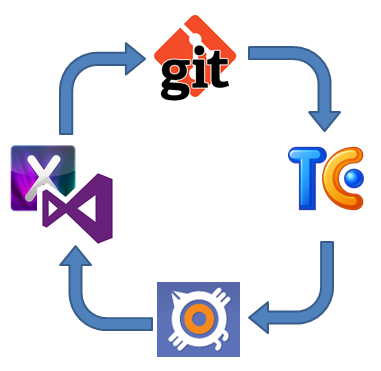
In addition to pizza, caffeine, and video games, a developer requires a lot of tools, and I mean "a lot". Each one is different so here I want to showcase what I use, and briefly explain why. The idea of this post rather than make any type of advertising (notice there are no links at all) is more to actually find out what other people use and share with you all my experience. So, the profile:  .NET Developer. The usual work: Web applications with ASP.NET (Web Forms and MVC) Windows Forms Windows Presentation Foundation Windows Phone Apps iOS Apps  Of course, I might code almost every day a bit of JavaScript and some HTML/CSS fixes, along with some other things, but that's not enough to consider it the main course. The Infrastructure Before coding, organization and planning is everything, and that means for me 3 things, since I am a SCRUManiac: Source Control Issue/Bug tracking Continuous Integration For source control, I prefer Git particularly, ...

Virtual Keyboard in iOS - part 2

Image
One the first entry of this series I covered the issues with the keyboard in iOS not hiding automatically when needed. In this second - and final - entry on the subject I am going to go for the most of annoying issue when creating UIs in iOS. The keyboard overlaps a focused TextField  If you have a TextField below the keyboard top edge position, they will be hidden once the keyboard shows up. The keyboard size is 320x216 points* in in portrait mode, so anything below the 264 (iPhone 4/4s) or 352 (iPhone 5/5s) points won’t be visible.  It is so simple that is almost unbelievable, but it happens as you can see in the images. Since this default behavior is inconvenient we are going for the workaround. The solution is not pretty but it is trivial: we need to place the UI elements inside a UIScrollView  and will use notifications to monitor when the keyboard will Show/Hide and will scroll the content of the container to ensure that views inside are always vis...

Virtual Keyboard in iOS - part 1

Image
When you are a developer for more than one platform, you might find that what is considered basic or pre-built in one, it’s incomplete or completely missing in another one. This entry is about fixing some issues with the virtual keyboard on iOS; especially when it hides your text fields or keeps the input focus. Xamarin Studio/Mono and XCode were used for this example. Hiding the keyboard Tapping inside the TextField will show the keyboard, but it won't be possible to get rid of it by tapping outside or pressing “RETURN” on it. This is something pre-built in Silverlight for Windows Phone. Tapping outside of the textbox or hitting the “back” key will hide the keyboard. But well, there is no back key on the iPhone. So let’s start by creating and extension method that we will use in the rest of the solution. The method will return the view that is the first responder or the “active” one. public static class Extensions { public static UIView FirstRespon...

Where is Silverlight now?

Time ago I wrote an article  about the comparison between of HTML5 and Silverlight. That article was indeed about the "comparison" itself rather than another attempt to compare the two; mainly because I consider that kind of measuring to be pointless. Then again with the pass of time the same question arises: is Silverlight dead? Before going into trying to answer that, allow me to be clearer than what I was at the time and let me rephrase the question: is the silverlight plugin for browsers dead? Well... the answer is yes, not even a "maybe". But as with any existing software, dead is not actually extinct. We still have people writing code in COBOL, FORTRAN,  DELPHI and VB6. And this is because the enterprise market does not move at the same pace as the consumer market. They invest in infrastructure, they keep it, and they treasure it. And Silverlight was highly adopted in the enterprise for LOB applications. So in that area, Silverlight is going to be there ...

New updates in apps and games

Image
Just recently updated a couple of apps. Loan Calculator Reversi (both Free and Full editions) Loan Calculator First the small "Loan Calculator" app, got a small update. The UI was simplified and some small glitches were addressed. Is hard to improve an app that is already quite useful yet simple. However new versions will improve it even more and not just cosmetic changes. Reversi Reversi got an "almost major" update, with an improved UI (at least over the previous one) and also a new feature that allows the user to see the possibles moves (hints), which of course, you can turn on/off. Hints are available and optional In addition to these improvements in the user interface, the internals were also improved a lot, the new game is quite faster than the previous versions and also plays better. Fixing an issue introduced with version 1.2 when the AI was... not so smart. For next versions... Sounds Statistics board All levels available ...

The invisible property of UIViewController

Popular wisdom says "things happen for a reason". However experience has proved me that when it comes to programmers, that is not always true. Things can just happen for no reason at all. That's why we require feedback, here is one and I assure you is in good spirit. So let's me write about something I found when building an app for iOS using Xamarin/Mono. The invisible property. Ranging from windows forms (desktop or Windows Mobile) to WPF, Silverlight/XAML on the web or windows phone. ASP.NET Web Forms or Razor, MVC or classic. One thing I can say for sure: any visual element  has a way to check for its visual status. Call it "Visible" in windows forms, "Visibility" in Silverlight/WPF. There is always an intuitive, simple and trivial way to know if something - that might be visible - it is visible at a particular moment or not. You can't imagine my surprise when I realized that the UIViewController in iOS does not provide such mecha...

Events and Multithreading

This is  the second and final part of this series. Will focus now a bit on what happen when we add multithreading to our work with events. Cleaning Up Events and Context Information In the previous post I mentioned some issues using lambdas and anonymous methods on events. The unsubscribe problem had a tricky "solution" by declaring a "cleanup" method inside the class that holds the event. public void CleanupSubscribers() { SayHelloCompleted = null; } The problem here is obvious since the cleanup method will remove all subscribers from the event. Hence, individually removing listeners from the event gets tricky when using lambdas/anonymous methods. So in this case the recommendations would be: Do not use lambdas if you need to unsubscribe. If you do so, use the cleanup method UNLESS your code is multithreaded.  NOTE: this only applies to the use of lambda expressions and anonymous methods, as for regular named methods yo...

The lambdas, the anonymous and the events

Combining lambdas, anonymous methods and events feels natural in C#, and we use them almost as a reflex, they help us to create closures and avoid creating state variables outside the scope of our methods or passing extra state data through event calls. But one thing that come with events is the fact that writing good applications implies making good use of the resources, meaning we have to dispose those we no longer need. When using events with lambdas and anonymous methods, is possible to forget about that, thus writing code that is not efficient and prone to crashes. Will start this 2-part series talking about the subscribe/unsubscribe behavior. Subscribe/Unsubscribe lambdas and anonymous methods Let's begin with a basic scenario using events in a single-thread context for now; just to keep it simple. The code fragment below contains the HelloEventArgs implementation as well as the publisher class MyClassWithEvents . public class HelloEventArgs:EventArgs { ...

Windows Phone vs iOS Development (with C#): Round One

Image
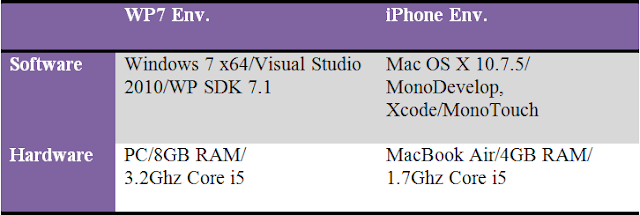
DISCLAIMER: This is not about iPhone vs WP7 devices; its about development tools. If you think you can enter into a device fight here, or you like to listen to Justin Bieber, you should leave the page now. I like programming, and that's it. Well...no. I LOVE programming. No matter the platform, OS, framework or  language; I find that programming is a rewarding experience. Of course as with anything in life, you want that experience to be as smooth as possible. And that's why I am so picky with development tools... They are supposed to make my work easier. And this entry is about that, comparing the development tools used to create apps for iOS (iPhone) and Windows Phone. Recently I had the opportunity to develop the same mobile app for two platforms: Windows Phone and iOS. While I have developed for these platforms before, I rarely have coded the same app (and a complex one) for the two of them. And this is a good chance to perform a comparison, beca...

New app and updates

Image
Crazy cars, the new game Recently added a new game to my list of apps for Microsoft Windows Phone, a game, and is called "Crazy cars" can be downloaded  here . The game have been download thousands of times and very short time! Check out the new UI created in Silverlight. Hidden Pics The app for hiding photos on you phone also get a new UI, more styled design and several bug fixes. Check out the new look. New updates are coming for this app, including encrypted photo sharing, fake passwords, bogus tiles and more.

The Loan Calculator App

Image
Few days ago I added a new App to my inventory on Windows Phone Marketplace. The Loan Calculator app was just something I needed when I was in a hunt for a car (still am). The thing is I wanted to keep it simple. Just input the numbers and see the total, how much, for how long, you know.. just the FINAL number. Which is what car dealers will never give upfront, because they always play that 101 psychology thing on you. So I built this app using the common formula that you can see around in many websites. The idea is pretty simple, just input the data and get the total final price and the monthly installments. As an extra you can also see how the amortization for the loan plays along time. Check it out, assume we want to calculate the final price for a car that cost 25k, we will put a  10% down payment, 2.5k, with an APR of 3.0%, and with a loan term of 3 years. Just enter the data and hit "Calculate" Then we just get the summary result with the final cost, se...

When somebody changes my code...

Well, initially I might get upset, but only if they break something. But here I am not talking a team member changing your code... No... that's OK This blog entry is about that 'non-deterministic' behavior that sometimes happens to 'us' while developing software and all of the sudden something does not work as it 'should' be. Who does not hate that kind of bugs right? This example is a real case scenario using Telerik components in a web application. Consider the following piece of ASPX code, I have placed a button and a label, the button 's click event in code-behind event will change the value of the label. Pretty simple right? Just a button with a javascript confirmation dialog before performing the page's post back. Now lets 'ajaxify' this... Using the new ajaxified code now have pretty much same effect, except we are not performing a full page post back, but only updating elements inside the UpdatePanel control. But what if I...

Nice panning and zooming in Windows Phone 7

A bit of time ago I published an app called Hidden Pics on the Microsoft Marketplace, on that entry I covered some basics on the Isolated Storage and the PhotoChooserTask for Windows Phone 7. On this entry I want to cover the zooming and panning. As part of that app, the user has the option to open a photo full size on the device screen and then pinch to zoom the photo.  They can also pan by dragging on the screen with the fingers. Now this is supposed to be very basic, but there is a catch, which is making the zoom stable. By stable I mean that if you use two fingers to zoom in the photo, once you finish the two fingers should have the same pixels behind them, which indicates that you zoomed proportionally and panned correctly. After googling around a bit I put together the code to do both zooming and panning properly. So here is the XAML for the control, I am using an Image control inside a Canvas with a CompositeTransform : The photo will start fully fitted on the Ima...

WCF, Data Contracts and Enums

Image
With Windows Communication Foundation it is easy to create any kind of services, of course my opinion could be biased because I am a .net (mainly c#) developer, but I really find hard to believe that someone could disagree with such statement. Of course there is a lot of know-how and trouble for beginners, specially trying to understand that WCF integrates all communication models we know (web, tcp, pipes, message queues) under one uniform paradigm. But there are some moments where you hit a rock in the path; years ago I stumbled upon the following scenario: I had a library “common.dll” that I used from both the client and the service. You might think this is not something you would do too often, and many people would say “that a client must not know anything about the service internals”. Well… that’s true, but this is not that case. It is just a situation where a client shares some business logic with the service. And the problem? Well, there is no problem with that config...

Disable ENTER key on web pages with multiple forms

Image
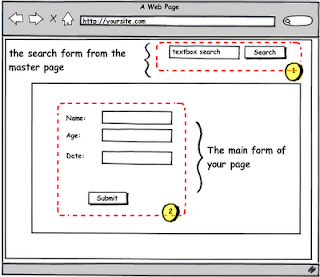
As an asp.net developer, you might find pretty common to have more than one form on a web page, sometimes you decided so, sometimes you just inherited a design and have to make it work. Let's just put the case where we have a form on the master page area, like a “search” or a “subscribe” button, and our inner page is a simple form with some fields to collect user information and submit it back to our site, like the image below. Both forms will cause well-formed postbacks to the server if you click either on the search or the submit button, however if you are typing on a textbox and you hit ENTER, anything could happen. You might have inadvertently submitted form 1 instead of form 2 or vice versa. Changing the default button of the page is simple and will help you if you know which button will be the one to respond to the ENTER key all the time. If you are using ASP.NET Just one line of code and you are done. However, this might not work smoothly across different browsers...